Search This Blog

Saturday, March 28, 2009

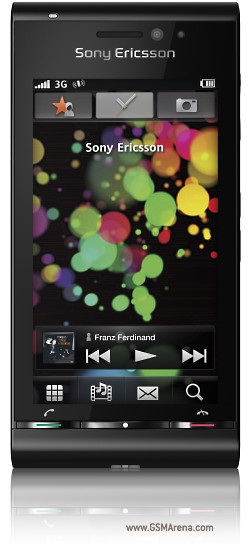
sony erricson idou(now called Sony Ericsson Satio )

Sony Ericsson Idou


General 2G Network GSM 850 / 900 / 1800 / 1900
3G Network HSDPA 900 / 2100
Announced 2009, February
Status Coming soon. Exp. release 2009, Q3
Size Dimensions 111 x 54 x 15 mm
Weight
Display Type TFT touchscreen, 16M colors
Size 360 x 640 pixels, 3.5 inches

- Accelerometer sensor
Sound Alert types Vibration; Downloadable polyphonic, MP3 ringtones
Speakerphone Yes
Memory Phonebook Practically unlimited entries and fields, Photocall
Call records 30 received, dialed and missed calls
Card slot microSD (TransFlash)
Data GPRS Class 10 (4+1/3+2 slots), 32 - 48 kbps
HSCSD Yes
EDGE Class 10, 236.8 kbps
3G HSDPA, 7.2 Mbps; HSUPA, 3.6 Mbps
WLAN Wi-Fi 802.11 b/g, DLNA
Bluetooth Yes, v2.0 with A2DP
Infrared port No
USB Yes, v2.0
Camera Primary 12 MP, 4000 x 3000 pixels, autofocus, xenon flash, video LED flash
Features Geo-tagging, face and smile detection
Video Yes
Secondary VGA videocall camera
Features OS Symbian OS
Messaging SMS, MMS, Email, IM
Browser WAP 2.0/HTML, RSS reader
Radio Stereo FM radio with RDS
Games Yes + downloadable
Colors Black
GPS Yes, with A-GPS support
Java Yes, MIDP 2.0

- Google maps
- MP3/AAC/MPEG4 player


- Organizer
- Voice memo/dial


Battery
Standard battery, Li-Po 1000 mAh

toshiba gt01

Toshiba lays the smackdown with


TG01


Toshiba-GT01.jpg

Brand Toshiba
Type TG01
Form factor Candybar
Color Black, White
Network
Phone Network 3G, EDGE, GPRS, GSM, HSCSD, HSDPA (3G)
Service 850, 900, 1800, 1900, 2100
Connectivity
Bluetooth v2.0 with A2DP
Infrared No
Wi-Fi (WLAN) Yes
USB Yes
Fax / Data No
Display
Main display Color TFT touchscreen
Color display 256000 colors
Dimensions 4.1 in.
Resolution 480 x 800 pixels
External display Yes
Memory
Internal memory Yes
External memory 32GB
Memory slots Yes
Storage types MicroSD
Basic
Battery Standard battery, Li-Ion
Standby time 276 hours
Talk time 5 hours
Calling
Vibrate alert Yes
Photo ID Yes
Ringtones MP3, Polyfone
Camera
Camera Yes
Megapixels 3.2 megapixels
Maximum photo resolution 2048x1536 pixels
Digital zoom Yesx
Optical zoom No
Auto focus Yes
Flash No
Recording video Yes
Second (front) camera No
Messaging
SMS Yes
MMS Yes
T9 text function Yes
E-mail Yes
Internet browsing Yes
Entertainment
FM radio No
Java Yes
Audio player AAC, AMR, MP3, WAV, WMA
Video player H263, H264, MPEG4, WMV
Features
Add ringtones Yes
Organiser Calendar, Calculator, Voice memo
Video call Yes
Other features OS Windows Mobile 6.1 Professional, Facebook and YouTube apps, Photo album/editor
Format
Weight 4.6 oz.


n97 comin this summer


Over two years ago we thought we knew what Nokia had in mind for their secret N97 phone. And we thought we had pictures too. Boy, were we wrong but then again nobody else had any facts about the future N-series handset. How were we to know that Nokia will launch its N97 only on December 2nd 2008? Here's what we wrote back then:
Well now, what do we have here? This device is rumored to be N97 and only time will tell if its Nokia's latest offering or a result of someone's Photoshop skills! According to the rumor mill, the handset is equipped with a 3 inch display and will in all probability have a 5 Megapixel camera with 20x digital zoom! The N97 promises both fun and functionality and will also include a miniSD card and 20GB of internal memory! We shall keep you updated on this one!
In the mean time Nokia surprised everyone with the touchscreen slider N97. It’s like an iPhone or a Storm. But dare I say... better? Nokia saw what people want nowadays and adapted. After trying out their first touchscreen on the Nokia 5800 XpressMusic, the Nokia brainiacs where ready for the next big thing. The Nokia N97 will certainly be the flagship smartphone of Nokia for quite a while. Here are some of its features, which will make you choose it:
  • a 3.5 inch widescreen 16:9 touchscreen
  • haptic feedback
  • full QWERTY slideout keyboard
  • 5 megapixel camera with Carl Zeiss Tessar lens and dual LED flash
  • up to 32 GB of storage
  • up to 16GB additional memory via microSD
  • Symbian S60 5th Edition
  • up to 37 hours of music / up to 4.5 hours of video
  • A-GPS and GPS
  • HSDPA, Wi-Fi, USB 2.0, stereo Bluetooth connectivity
  • a 3.5mm headphone jack.

check out the video.... COOL PHONE


Thursday, March 26, 2009

iphone vs palmpre vs gphone-ur choice?

CES 2009 brought us a new player in the smartphone upper-echelon. Let's drill down and see how the Palm Pre compares with the iPhone and Android's G1.

1. Multitouch touchscreen/gesture control: All three are capacitive, only the Pre and iPhone have multitouch. The Pre's glowy little "gesture area" has dropped the touchable real estate all the way down tto the bottom of the phone, which is great for being able to navigate with one hand and not interfere with the screen at all. The wavey dock you bring up from the bottom looks awesome, but can you use it out of the box without a second thought or page through the manual? That's my question. Advantage: iPhone/Pre tossup.

2. Multitasking: One of the beefiest of our beefs with the iPhone SDK is its insistence on Apps running one at a time. The G1's notifications drawer was definitely a step in the right direction, but the Pre's interface is the first smartphone OS that was built with multitasking as a core design element. Resembling the Xbox's old Blades, or a less-jarring OS X Expose even, the Pre's "Cards" interface always places you in the context of every app running for fast switching, and notifications from other apps don't pull you away completely from the task at hand. Multitasking is hugely important on a phone, and it's a good sign that Palm recognizes. Advantage: Pre

3. Hardware: Adrian says:

While the hardware is definitely high quality, I'm not entirely blown away by the design. It looks really nice, and original, but it's a little too cutesy in shape and kind of reminds me of an oversized pebble. A slightly larger screen could have definitely been put to good use, and I really don't like the black space on the sides of the screen.

A phone with a built-in QWERTY still hasn't touched the iPhone in terms of sleekness and pure sex. And it might still be a while. Advantage: iPhone

4. Development platform: The Pre's "Web OS" sure sounds nice—all developers need to know is JavaScript, HTML and CSS? Sounds good in theory, but building a mobile app will never be as easy as cranking out a new theme for your Tumblr. Palm's stressing ease of development, though, so it will be interesting to see how it stacks up against Apple's solid, familiar-to-devs OS X-based SDK and Android's fully open source approach. Advantage: Pre? If it's straight-up JavaScript, that's a lot of programmers ready to go. Note: we had iPhone here before, but we've switched with a qualification. Developer community still goes to iPhone for volume.

5. Web Integration: The Pre subtly integrates the internet into the phone at every opportunity, and it's awesome. Contacts get pulled in from Facebook, Gmail, IM and and scanned for dupes; the messaging app shows your last several emails, IMs and SMS with that contact in a single window. Really, really smart stuff. Advantage: Pre

6. App Store/developer community: A smartphone is only as good as the software it runs. On the Pre, Palm is still keeping application delivery details like pricing behind the curtain, but they did say the app delivery will be entirely handled by the phone (without a desktop app), which is a shame. They're saying that they're not going to duplicate Apple's Hobbesian app approval black box mistake, which Android has also hasn't fallen for, but there will be an approval process based on "security and stability." But as we know with Android, a dev community needs enough devices in the hands of consumers to reach critical mass, which the Pre will have to match. Advantage: iPhone, even with the black box, but Android and Pre's more open stances are reassuring.

7. Wireless charger: We've seen wireless charger tech for years at CES, but it's taken this long for a major consumer gadget to come bundled with its own wireless charger in the box. Whoops, it's not in the box, sold separately for unknown $$. But still: Bravo. Advantage: Pre

8. The Network: Dan Hesse, Sprint's CEO, gave our coast-to-coast 3G test a shout out in his press conference. Of course he did: Sprint won (in download speeds). Sprint was the only major carrier without a powerful, hype-catching smartphone choice, and now they have one. The Pre is a data-centric phone with a network we've proven to be strong in a large swatch of the country—that's a good combo. But would you switch to Sprint for the Pre? Ugh. Advantage: Not cut and dry for everyone, but we stand by our numbers: Sprint is the best 3G network in our tests.

9. Physical keyboard: It's preference, but one held by a large swathe of the gadget buying public: physical QWERTY keypads are still the mainstream input of choice. Touch is getting better all the time, but a lot of people still want physical keyboards. But better yet is the ability to choose; unfortunately, the Pre doesn't have a soft onscreen keyboard, and its slide-out is the same meh QWERTY from the Treo Pro. Advantage: It's preference, but on me, the iPhone's soft keyboard can't be beat.

10. Camera: The Pre has an LED Flash for its 3MP camera, something both the iPhone and G1 lack. Flash cellphone photos are ugly, but for a lot of people, they're good enough. So credit for throwing it in. Advantage: Pre

11. Battery: Apple's still an outlier with their non-removable battery; like the G1's, the Pre's comes out for a spare swap too. We've heard Apple's reasons for this a million times, we know the drill, but removable batteries will never stop being handy. Advantage: Pre

12. Copy & Paste: Yep, Pre's got it. iPhone still doesn't. Advantage: Pre/G1

13. Browser: All three use a browser based on WebKit, which has become the standard for the mobile web. We couldn't put it through our Mobile Browser Battlemodo ringer obviously, but what we saw looked great, and it's the only other mobile browser besides the iPhone that supports multitouch zooming. Advantage: iPhone/Pre

So there you have it. We're excited. Are you?

black berry storm vs bold

Lately Blackberry have attracted all of us with their new handsets, which are the Bold and the Storm. I believe that many people who are common to these things are wondering what are exactly the differences of Blackberry Bold vs Blackberry Storm. Before we talked about the differences, let’s talk about the similarity. First of all, it came from the same manufacturer, and therefore it is not surprising how similar their features are.. Both Blackberry Bold and Blackberry Storm has HSDPA network, GPS, camera, BlackBerry OS, BlackBerry Maps, etc. But really, is there any other differences between the two blackberry devices besides of the Touchscreen and QWERTY keyboard? Let’s take a deeper look.

  • Network: Bold can work for HSDPA 850/1900/2100 (Triple Band HSDPA), while Storm can only work in HSDPA 2100 MHz frequency and CDMA2000 1x EV-DO (only for 9530 series)
  • Dimension and Weight: Bold has 114 x 66 x 14 mm and 133 grams, while Storm is heavier in 155 grams and 112.5 x 62.2 x 14 mm measurement
  • Display: Storm definitely outperform Bold with 360×480 pixels (3.25 inch) and Accelerometer sensor for auto-rotate. Bold in other side has 480×320 pixels, that I think sufficient enough
  • Wi-Fi: BlackBerry Bold has Wi-Fi, 802.11a/b/g, while BlackBerry Storm has not! Too bad! It’s a big minus for BlackBerry Storm, in my opinion.
  • Camera: Bold has 2 megapixels camera, while Storm has 3.15 megapixels camera. However, better resolution doesn’t mean better quality.. But what’s interesting is the Blackberry Storm’s touchscreen even work as autofocus :)
  • Music: Blackberry is not famous among music lovers due to the not-so-good audio performance, but the Storm and Bold got the same score here, since both of them has a standard audio jack, the 3.5mm jack.
  • Battery: Bold is equipped with Li-ion 1500 mAh, bigger than Storm that only has 1400 mAh. But Storm’s battery life is claimed to have better standby time and talktime. Does Storm has better battery management?
  • Price

    Well, for many people (including me), one of the most important aspect of a cell phone is its price :D. So here’s the price comparison between Bold and Storm when I wrote this article (you can use it as a guide in the future, when the price drops). So I took the price comparison from Amazon, and various prices are offered for Bold and Storm. The Blackberry Bold’s price range is between $499-$550 for a new one. Meanwhile, Blackberry Storm has the highest price, which about $550 or so for a new one. Or perhaps if you follow the AT&T plan, you can get Blackberry Bold 9000 for $249.

What about people’s opinion about the Blackberry Bold and Storm’s Design, Features, and Performance?

Well, everyone has their own taste, I know. And therefore I’m gonna use the voting result from our folks at GSMarena to capture people’s opinion. You can see the Blackberry Bold and Storm score yourself

Blackberry Storm 9500

  • Design: 7.9
  • Features: 7.6
  • Performance: 7.6

Blackberry Bold 9000

  • Design: 8.4
  • Features: 8.4
  • Performance: 8.4

So, which one is more suitable with your preference? Checkout the in depth comparison between the Blackberry Bold vs Blackberry Storm here (the comparison also includes Curve 8900!)

FOR LATEST HINDI AND TELUGU MUSIC
VISIT
IMUSICWORLD.BLOGSPOT.COM


Wednesday, March 25, 2009

HOW TO INSTALL CRACKED APPLICATIONS ON YOUR iPhone/iPod TOUCH

So first thing that you need to do is that YOU CANT install cracked apps without a jailbroken device ( iPhone or Touch ). So since i belive in the power of decision and the beauty of options i will offer you 3 methods of installing cracked apps.

  • iTunes method aka .ipa method.
  • SSH method aka direct method.
  • IPAPREP method.

First let me answer some questions for you :

What is SSH?

SSH is a secure way of transferring information (including files) between computers on a network. SFTP is a secure way of transferring files which, despite the name, has little in common with FTP. (definition via link).

What is WinSCP?

WinSCP (Windows Secure copy) is an open source SFTP and FTP client for Microsoft Windows

. Its main function is secure file transfer between a local and a remote computer. Beyond this, WinSCP offers basic file manager functionality. For secure transfers, it uses Secure Shell (SSH) and supports the legacy SCP protocol in addition to SFTP. (definition via link).

METHOD 1 : iTunes method aka .ipa method

First you need TO MAKE SURE that you patched your MobileInstallation file on your device. If you didn’t patched it , you WONT BE ABLE to install cracked apps. Check out how to do that here.

This is simple and painless. Double click on the .ipa file and sync your device. Thats it. But just in case you want to know more , this is what is happening. By double clicking the .ipa file, you will open the file with iTunes. The file will be automatically copied into iTunes library. Once iTunes is loaded and the files was opened , you just need to press sync, and the instalaltion begins.

METHOD 2 : SSH method aka direct method.

This is a little bit more complicated, but you will need to learn how to do this stuff sometime.

1) Download the cracked game/app and extract the AppName.app folder to your desktop or what ever your comfortable with. Make sure its easy to find.
2) Copy AppName.app into /Applications via SSH and set it’s permissions to 0755 (chmod 0755 AppName.app ).
3) Create a folder called Documents in /var/mobile/ and set permissions to 0777. (only needs to be done once).
4) Reboot your device.

NOTE : just to make sure AppName.app = the name of the app or game you just downloaded and you want to install it into your device.

METHOD 3 : IPAPREP method ( the easiest method, saved the best for the last )

All you need to do is to add the xsellize source in cydia and install this package. It will auto patch MobileInstallation file and backs it up for you, so you can continue being lazy and not learning new stuff.

Once you done that just use method 1 : iTunes method aka .ipa method.

Wolfenstein 3D $5 on App Store $0 on Cydia. Exact Same Game. Legal.
Mar 25, 2009 - 12:09 AM - by cash7c3


Click the image to open in full size.


ID Software released the ever popular Wolfenstein 3D Classic for iPhone on the App Store on the 23rd of March for the price tag of $5. Now just two short days later Zodttd has released the exact same game on Cydia for $0. Yes when I say exact same game I really mean it is the SAME game.

The game is published by ID Software under a General Public License (GPL). If you check out the ID Software's Wolfenstein site you can grab the source for download in the bottom right corner. Zodttd simply downloaded the source, compiled, and published to Cydia.

iNav for Winterboard With a Philippines Twist - PinoySoul Download and Install

Do you remember this remix of iNav Theme for iPhone and iPod Touch? It’s the one you all been waiting for. Today Reymond finally send it to me, so i can share it with the world : it’s PinoySoul. .PinoySoul+ is a complete springboard theme for the iPhone. This is a theme mod from iNav theme by Reeco and you can download it from here.


HOW TO USE ?

Prior to installation make sure you have already installed CATEGORIES and ofcourse WINTERBOARD (Latest version of both applications recommended).Since this theme is still on its way to Cydia, we need to install it manually. But before that:

(more…)

Continue reading...
Bookmark and Share